

Where the data comes from
Land and ownership data comes from HM Land Registry. It is updated monthly.See who owns a site
- Click a land plot on the map. The Land & Ownership pop-up opens.
- Click Show full info.
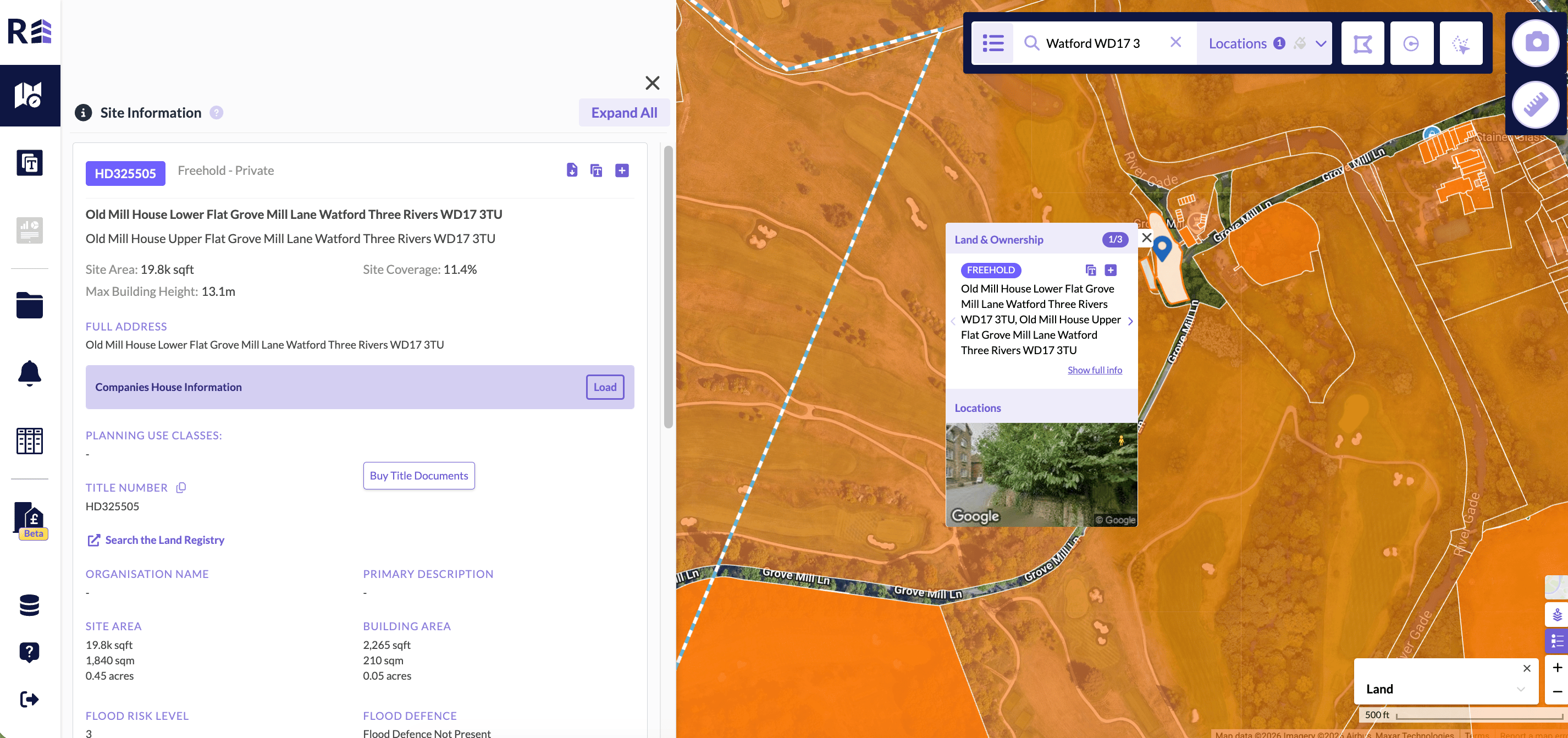
The Site Information panel for a selected land plot.
Search for a company
You can search Land & Ownership for a company. Use this to confirm that a company owns a site, or to see how many sites it owns across the UK. Many companies register land under sister and parent companies. Include all of them to get accurate results.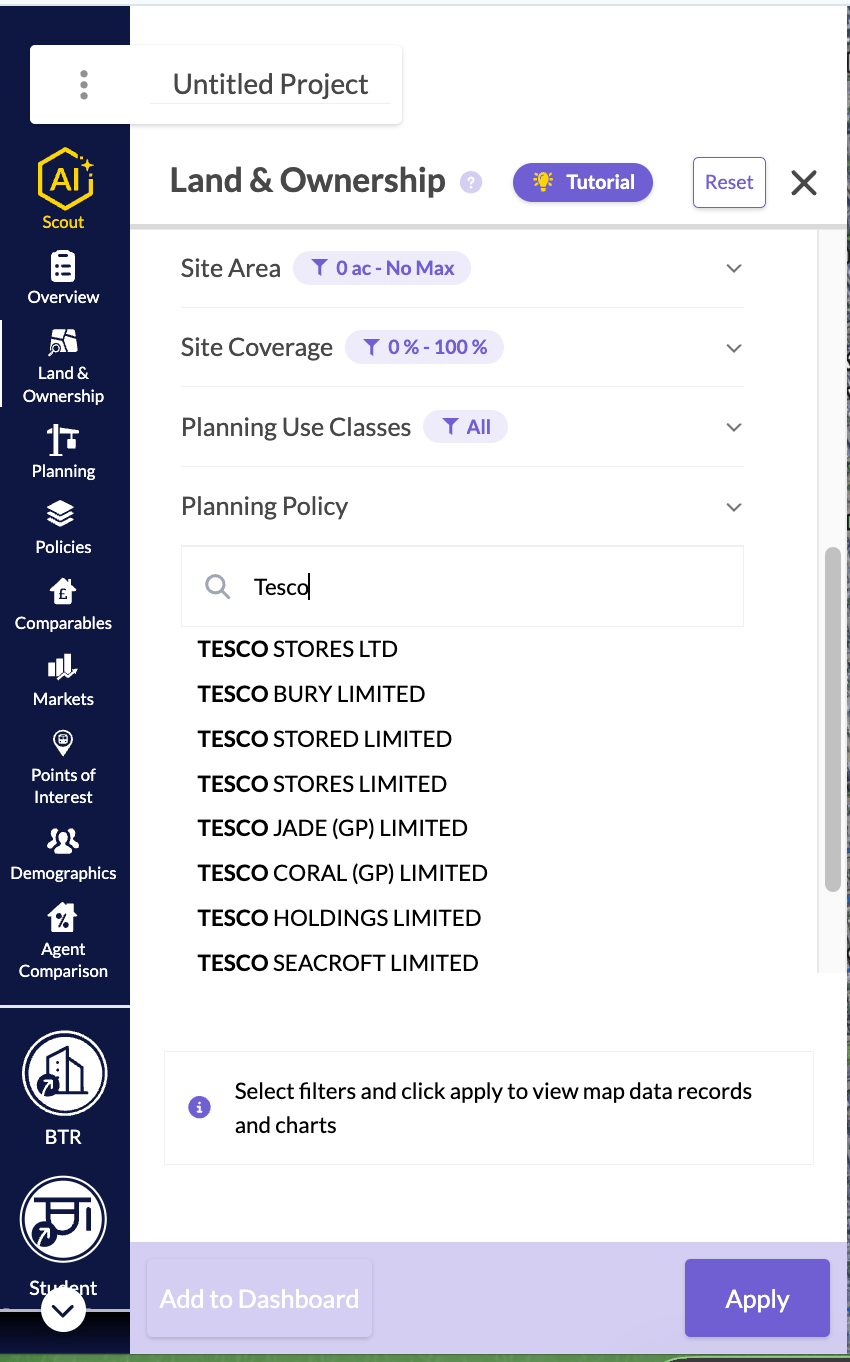
Companies House information
A Land & Ownership record can show Companies House details for each company that owns the title. The panel sits below the proprietors.- Click a land plot on the map, then click Show full info. In a list of Land & Ownership records, click More Info on the record instead.
- In Companies House Information, click Load.
- Match: Confirmed match means the company number is recorded against the title at HM Land Registry. Name match means Companies House found the company from the proprietor’s name.
- Status: for example, active or dissolved.
- Company no.: the company number and the date the company was incorporated.
- Reg. office: the registered office address.
- SIC: the company’s SIC codes and what they mean.
- Officers: the current directors, secretaries and LLP members. Each officer shows their role and the date they were appointed. The heading shows how many are active. The first two are shown. To see the rest, click Show all with the number of officers, for example Show all 5 officers.
- Charges: the total number of registered charges and how many are outstanding. Click Charges to open the list.
- Use the Outstanding and All tabs to choose which charges you see.
- Each charge shows who holds it, its status, its type and the month it was created.
- Click Full charge register on Companies House to see every detail of the charges.
- View on Companies House: opens the company’s page on the Companies House website.
Companies House information is not available for land in Scotland.
If the information does not load
- No registered company ownership was found for this title: the title is not owned by a company.
- These proprietors are not on Companies House: the owners appear to be registered outside the UK, so their charges and control data are not available. Use Search the Land Registry to look them up.
- Not loaded call limit reached: too many requests were made. Click Try again in a few minutes.
- Companies House is unavailable: click Try again.
Explore the ownership network
The ownership network is a diagram of the companies and people that own and control a title. It uses Companies House data.- Load Companies House Information for the title, as described above.
- Click View Ownership Network.
Follow the chain of control
- On a company card, click Expand ownership. The companies and people that control it are added to the diagram.
- Expand those companies in the same way to follow the chain.
- To remove them again, click Hide with the number of controllers, for example Hide 2 controllers.
The end of the chain
The chain ends with one of these cards:- Individual PSC: a person with significant control.
- Protected PSC: Companies House has suppressed the person’s details.
- Legal person PSC: a legal person with significant control.
- Overseas company PSC: a company registered outside the UK. Companies House holds no further data on it.
- Corporate PSC marked Not on the Companies House register: the company number in the PSC record does not match a company in our data.
- PSC statement: the company has filed a statement instead of naming a PSC.
- No PSC register: the company is exempt from keeping a PSC register, so no controllers are listed.
Move around the diagram
Use the buttons on the diagram:- Legend: shows what each card and line means. It lists only what is on the diagram.
- Fit to screen: fits the whole network on screen.
- Tidy layout: lays out all the cards again.
- Zoom in and Zoom out.
See officers and charges
A company card shows its Officers and Charges.- Click Officers to open a panel with the company’s officers and its full list of charges. To include resigned officers, click Show with the number of resigned officers, for example Show 3 resigned officers.
- Click Charges to open the list on the card. It has the same Outstanding and All tabs as the Land & Ownership record.
See the land a company holds
- On a company card, click View land held. The link shows how many titles the company holds.
- The panel lists the titles where the company is the registered proprietor, across the country. It shows 20 titles per page.
- To add titles to your dashboard, select them and click Add to Dashboard.
- To open the dashboard, click View dashboard in the message that appears.
Find likely related companies
- On a company card, click Find likely related companies.
- The panel lists companies that share a current officer or controller with this one. Each one shows why it is listed, for example Shared controller.
- To see more, click Show 5 more. The button also shows how many are left.
- To add a company to the diagram, click Add to network. It appears as a Likely related card.
Title documents
A title is a document that shows the chain of ownership for land or property. Titles are registered with HM Land Registry.Buy title documents
You can buy title documents in REalyse Core, without going to the government site.- Select the plot of land.
- Click Show full info.
- Click Buy Title Documents. The Land Registry Title Documents Purchase pop-up opens.
- Select the documents you want, Title Plan, Title Register or both. The Total updates.
- Top up your credits if you need to, then click Confirm.
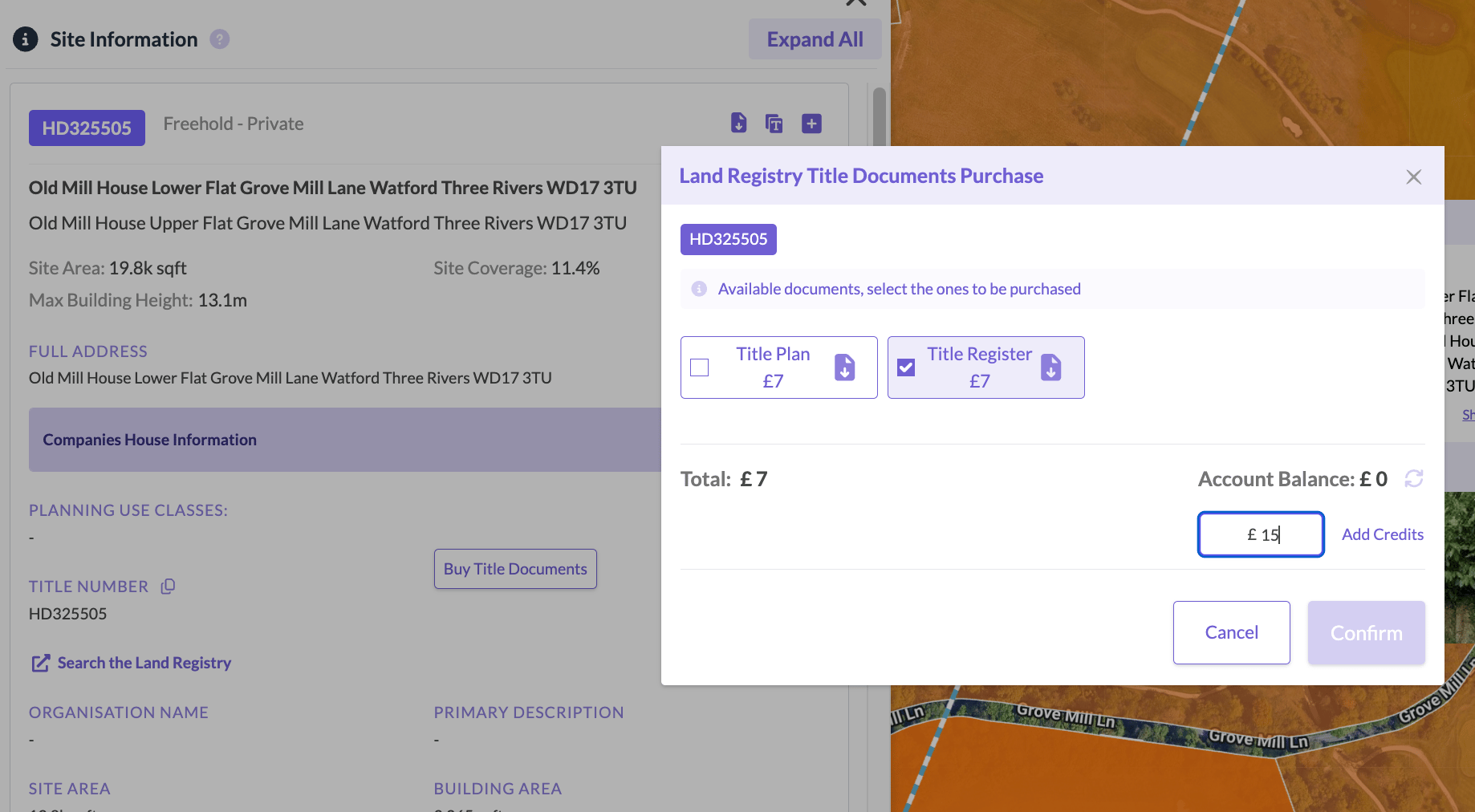
Choose the title documents and top up your credits.
Add credits to your account
You need credits in your REalyse account to buy title information. You can add them before you check out.- Check your Account Balance, then enter the amount you want to top up.
- Click Add Credits.
- Complete the payment on the payment page.
Related titles
You can export the land plots that match your search to an Excel file. Because your search is for either freehold or leasehold, you are asked before the download whether to include related titles. Related titles are the leaseholds linked to a freehold, or the freeholds linked to a leasehold.Create a project for a land plot
Find the land plot and click the T icon on its Land & Ownership pop-up. Hover over it to see Create project about this plot. The templates panel opens with Global Templates, Team Templates and Personal Templates, and the plot is set as the location. You can then run a template on the plot. The template fills with the relevant data, and you can save it as its own project.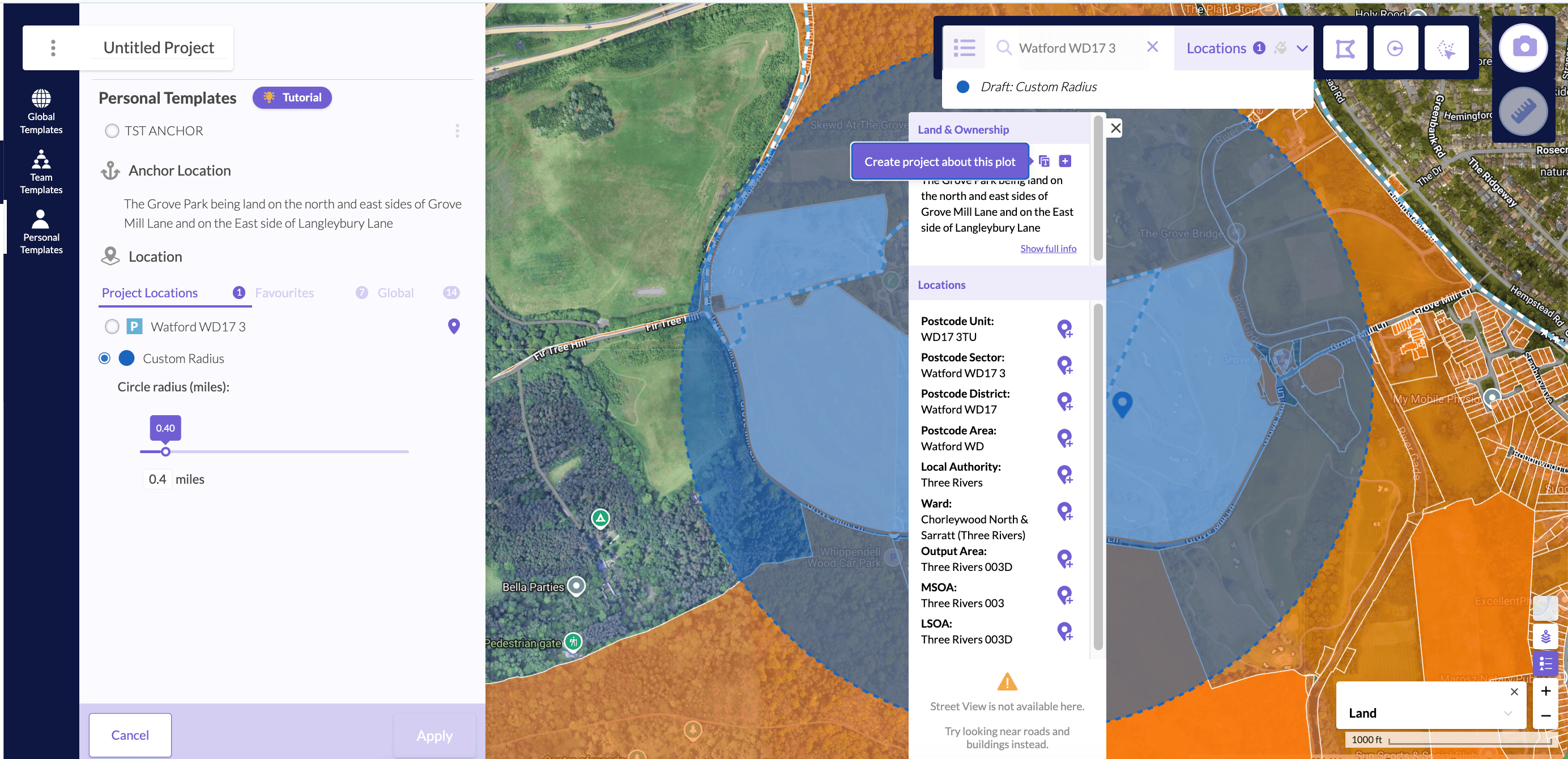
Create a project about the selected plot.